Holy Macro-roni!
Create Your Own JavaScript Operator using Macros

We want more
Recently, I've been learning more about how to get the most out of our favorite programming languages. Everyone knows that JavaScript in particular can quickly become unweidly and unsightly with just a bit of nesting, callbacks, etc, and many developers have already taken into their own hands to come up with solutions to produce more elegant, yet just as effective code from the natural (often referred to as "vanilla") language. One example of this is Coffeescript- a language that compiles into JavaScript, but is much more aesthetically pleasing to work with.
Enter, macros
As great as these other languages are, there's also another really nifty solution- creating macros. A macro is simply a piece of code that parses and transforms the code around it. Like most concepts in programming, this is a very basic idea, but also incredibly powerful when you consider just how it can help push a language forward. In this post, I will cover a basic example of how to utilize Sweet.js- a library for creating macros in JavaScript- to create your own JavaScript operator!
The awesome "Rocket operator"
The code snippets from this blog are taken from an excellent Sweet.js course on Plurlsight, which I'd highly recommend checking out if you like what you see here. What we're going to do is create a new operator to clean up the normal boilerplate code we'd expect to see in a regular JavaScript promise.
Here, we see a normal JavaScript promise (disregard the $ followed by numbers, that's known as "variable hygiene" which Zach does a great job explaining here). This is a basic example, but this syntax can get messy quick.

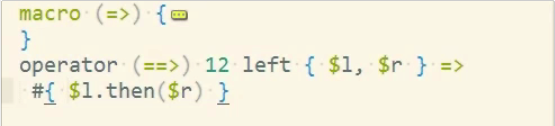
Now, we can use Sweet.js to create a macro to take the place of all that syntax, and still have it be incredibly expressive! Here's what's happening:
The '=>' represents a macro that does the same thing as a function "fat-arrow" from Coffeescript or ES2015 (aka ES6).
The '==>' represents our new macro that condenses promise boilerplate.
The '12' refers to our new operator's precedence (you can assign any value you wish). Every operator has their own precedence, which you can find here.
The { $l, $r } represents whatever will be found to the immediate left and to the right of our '==>' operator.
The => #{ $l.then($r) } represents our expected output. In this case, we'll have the code from the left of the operator, followed by a call to .then, passing the code from the right of the operator as an argument to .then.
And here is your new "Rocket" operator in action! Ain't it pretty?

Niceee. But why use macros instead of XYZ?
With some basic macro use, you have the power to extend your favorite programming language. Read about an awesome ES20XX feature/function that you wish were available today?? PutAMacroOnIt
Additional Resources
If you want to learn more about macros and Sweet.js, here are a few awesome blog posts to help you get started!
Case-based Macros with Nick Balestra
Rule-based Macros with Luke Savage