Measure Twice, Cut Once - Planning with Diagrams and Test-Driven Development
Last week I had the opportunity to work on my first Backbone.js project with another developer who was also trying the framework for the first time. We were building a Blackjack game, and going into this project I knew that Backbone takes a bit of a different approach to structuring applications compared to frameworks that I’m used to, specifically Rails. In my mind, I have an understanding about how Models, Views, and Controllers are separated and behave, but in the world of client-side frameworks, this understanding was in need of some re-wiring.
This post isn’t intended to detail the difference between Backbone’s architecture compared to framework ‘X’, rather, a few techniques that helped me get the most out of my time while solving a problem with a new set of tools. When I’m trying new frameworks or libraries, I catch myself often spinning my wheels with some things that weren’t necessarily essential for the problem at hand. It’s very easy to go down a rabbit hole when playing with new technologies, because it (usually) is fun to tear things down and see how they work, and we as developers/engineers/tinkerers have this natural curiosity. However, when you’re on a schedule, you need to stick to a plan and remain cognizant of how you’re investing your time.
The first practice that I’ve really come to appreciate is creating a diagram of your application. As much as I love digital copies of everything, I find myself retaining information much easier when I put a pen to paper and start sketching things out. This became incredibly useful when approaching Backbone because, by its own nature, it has very little care for strict rules over architecture, leaving it almost entirely up to you to decide. For seasoned developers, this can be very liberating if you feel shackled by the ‘convention over configuration’ mantra of frameworks, like Rails. Seeing how this was my first go at not just Backbone, but a JavaScript framework in general, creating a diagram helped me by making me consider the following:
- the flow of communication and data throughout the application
- how the event system operates
- understanding the difference between DOM events (‘click’) and their relationship to user intent (‘Hit’ or ‘Stand’)
- loose coupling between objects (minimal dependencies)
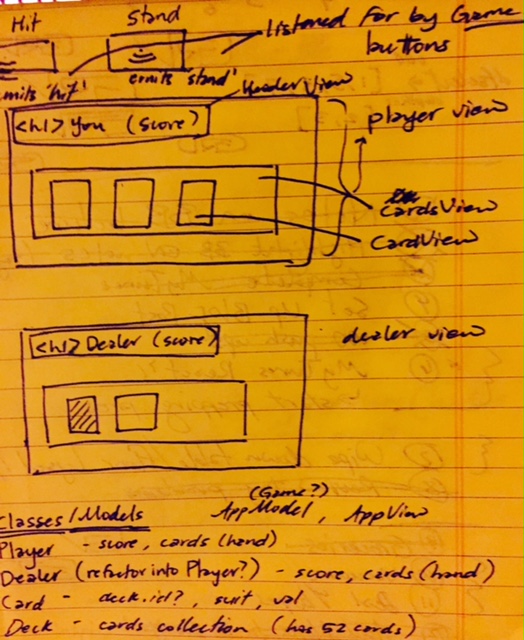
Below is one of the first diagrams that I created to get an idea of what the interface would look like, how they communicate, and what classes would be necessary for an MVP. I’ll likely be getting a whiteboard for future diagramming as we move into projects beyond the scope of toy problems.
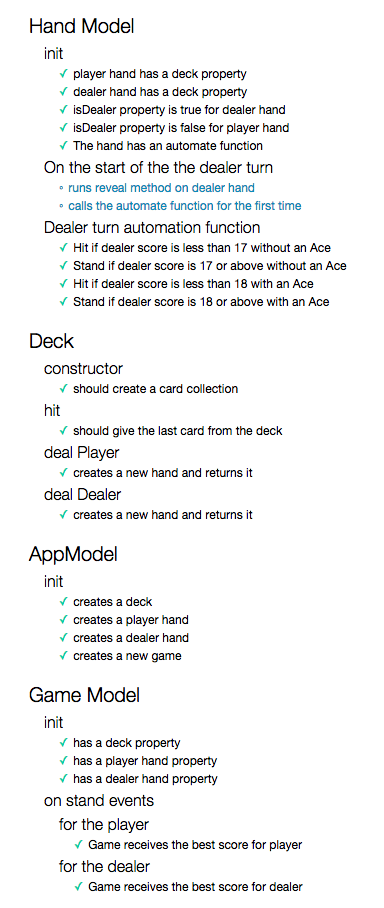
The other practice that really made a difference in how we approached the problem is Test-Driven Development (TDD). ’Approached’ probably isn’t the right word, considering we didn’t start testing until we had the basic functionality of the game working (I know, not great), but it definitely made us reconsider a lot of the code we had already written. As we started writing tests, we noticed that we were simply writing tests that made our current implementation pass, rather than writing specs based on what we believed each component should do/be responsible for. As we began to place more emphasis on the latter, we noticed that a lot of our logic was placed in several illogical places, so we wrote specs for how the game should operate, and began refactoring to meet this new architecture. Upon finishing, we had much cleaner models/classes, functions with single-responsibility, and proper event handling. Prior to this refactoring, most of our code that we didn’t know where to place ended up in a central ‘dump’ that was globally accessible. Deleting this area after refactoring, and knowing that not only did our app still worked as well as it did before, but was also much easier to comprehend, was very satisfying. We thought that investing time to learn how to properly test our code would have taken too long, but it turns out we lost time needing to refactor everything we wrote, anyway. Had we started with tests and a clear plan from the beginning, we would have been much more productive from the start.
As I move into new projects, I look forward to the planning stages more and more. By adopting these techniques, I can gain a stronger understanding of how I want the application to work, what the architecture will look like (diagram), and the incremental steps in building everything out (TDD). By measuring out the scope of the problem and planning before writing a single line of code, I can greatly increase the chances of staying on schedule while maximizing my productivity. I’ll be sure to share more posts about these kinds of tips and tricks as I try them out for myself.